Check OB3 version number
ACCESSING OB3 VERSION NUMBER
You can get the OB3 version release number from your web browser developer console by typing OCEANBROWSER_VERSION. You can access developer tools in Chrome from the "dot dot dot" menu at the top right of Chrome.
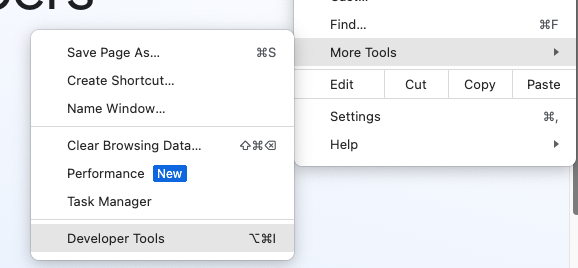
FIGURE 0: accessing Chrome developer console from More tools
The format of the OB3 version is OB- followed by a number which is in expressed in the Javascript "date now” format. Date now is "the value in milliseconds that represents the time elapsed since the Epoch”.
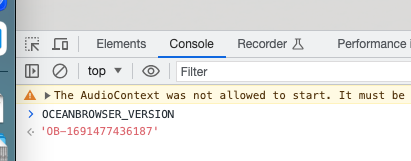
FIGURE 1: obtain the OB3 version number
To turn this number into a human readable date and time: type the following commands:
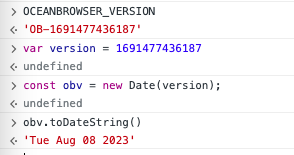
FIGURE 2: Javascript commands to convert OB3 version number to human readable format.
So we can see here that the version of OB3 currently running was built (and typically also deployed) on Tuesday August 8th.
NOTES ON OB3 UPDATES AND DEPLOYMENT PROCESS
We use a continuous deployment model and we’re currently deploying updates to OB3 every week. The Azure Cloud allows us to deploy an update of OB3 to our staging environment (staging.ob3.io) and “swap” it into production. In the event of any issues being detected we can “swap” it back out - restoring the previous version which will now be sitting in staging. This process does not interfere in any way with users currently using OB3 (zero down time deployment). The Azure Application Insights monitoring system allows us to watch interactions on the system in real time including any errors or faults - so if there is any undesired change in the system we can swap back to the previous release.
8th AUGUST OB3 UPDATES
In the example above on 8th August we deployed improvements to the sharing and permission dialog box. This was to address feedback from learning support staff, and support ticket incidents, where instructors have accidentally deleted groups from course sharing setup, accidentally thinking that they were clicking the “close” checkbox for the dialog. The improved design changes the layout to add a red close “x” where users expect it to be.
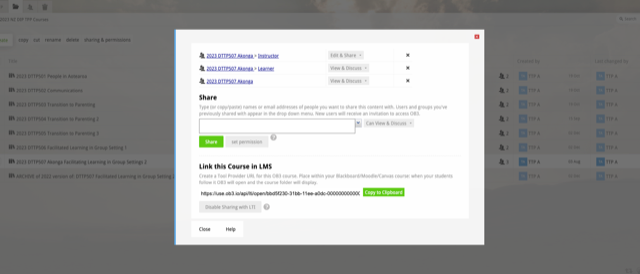
FIGURE 3: Improved sharing and permissions dialog box
This update also include an enhancement to the sharing dialog box: if a teacher attempts to delete an LTI group from the sharing dialog box (under Edit and Share privilege) they will be prevented and instructed to edit the course from the PMA account. This is to prevent novice instructors from accidentally deleting vital groups from a course by accident.
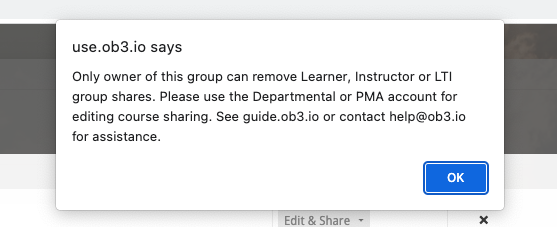
FIGURE 4: Sharing and permissions warning dialog, prevent teachers from deleting LTI sharing groups from course from a teacher OB3 account
ROUTINE UPDATES (weekly) VS MAJOR and FEATURE UPDATES (periodic)
Typically the changes we deploy on an ongoing basis are routine updates, minor feature updates or bug fixes. Where a change has any potential to impact users we would go through a consultative process to seek feedback. We feel that it is overkill to notify all users of these types of routine ongoing updates so we typically just deploy them and maybe seek advice or feedback from one or two users where appropriate, especially where a student or staff member has been affected by an issue. Recent examples include an enhancement to table editing, we now warn students if they attempt to delete a table or a table column containing lots of data (this in response to portfolio students accidentally deleting a table or column when they wanted to delete a paragraph...)
Major updates occur less frequently and we would normally time these for semester breaks. These will always go through a consultative process with clients with the opportunity for feedback and an explanation of what we are updating and why.
RECENT UPDATES / CHANGE LOG
We are not currently maintaining a customer-accessible change log ("Recent updates") page. We have mulled over the idea of surfacing the version release information more prominently in the application, perhaps in the footer area of OB3. This could potentially be linked through to a Recent Updates page (see below) to allow users to more easily track updates in the app. If you think this would be a good idea please let us know (to help@ob3.io)